the backend, already built

What if the hard part was already done?

The UI is the easy part these days. Logins, users, permissions, forms, workflows… that's where the weeks go. Oblax gives you that part, ready to use, behind one API.

  • secure by default
  • scalable
  • pay as you go
  • integration ready
  • any platform
  • data sovereignty
The way we build is changing

Building frontends got faster.
Backends did not get any simpler.

You can generate a UI in minutes now. Cool. Someone still has to handle the logins, the permissions, the file uploads, and the database that shouldn't fall over when real traffic shows up.

Frontend velocity

AI-assisted UI generation, component libraries, and no-code tools have compressed frontend development from weeks to hours. The bar for shipping a polished interface is lower than ever.

Backend complexity

Every new app still needs the same auth system, the same file handling, the same CRM logic. None of that disappears just because the frontend was generated in an afternoon.

Oblax handles the backend layer. Use any frontend approach you want.

Consistent workflows underneath, no matter how the UI was built.

Oblax is a modular Backend-as-a-Service that provides complete business workflows like Authentication, CRM, Forms, Storage, Inventory, and much more through a single API. Enable modules, configure workflows, and start building immediately.
No-nonsense productivity

So, what is Oblax, exactly?

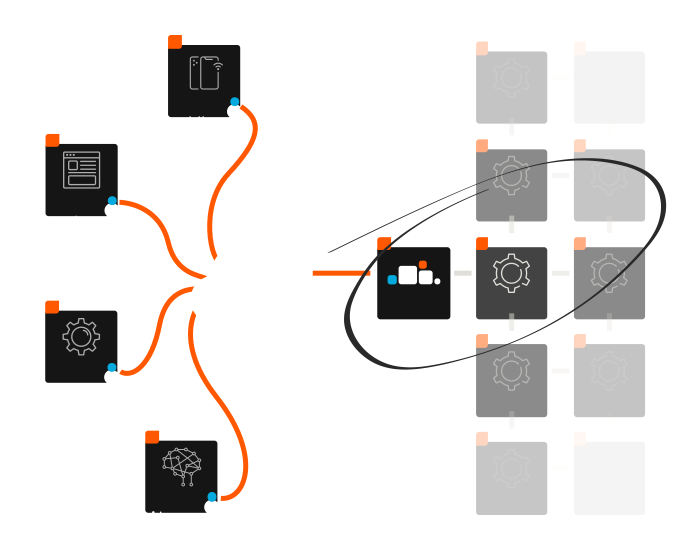
A pre-built, pre-hosted mesh of small backend services. Each one handles a single business domain (auth, identity, forms…), and the whole platform sits behind one secure, standardized, and well-documented API.


Every service is built to scale, so more users don't have to mean a slower app. Each application also gets its own database, guarded by a fine-grained access control list. Your data doesn't mix with anyone else's.

What is Oblax
How Oblax works

From zero to working backend in three steps.

No infrastructure to provision. No boilerplate to write. Just pick what you need and start calling APIs.

  • 01 / Account

    Create your account

    Sign up and create your workspace. That's the whole step, really.

  • 02 / Initialize

    Set up your backend

    Create a project and turn on the modules you need. Auth? Forms? Both? Flip the switch.

  • 03 / Connect

    Connect your app

    Grab the SDK (or plain HTTP, we don't judge) and start calling the API.

Modules

Not primitives.
Ready-to-use systems.

You've built a login system before. Probably more than once. These are the parts every app needs, built once and ready to use from day one.

  • Under active development
    auth

    Accounts & Login

    Sign-up, login, and sessions for web, mobile, desktop, or backend apps. The part every app needs and nobody wants to build again.

    • Secure Login. Authenticate with email and password.
    • Session Management. Secure cookies or JWTs.
    • Platform Support. Authentication for web, mobile, desktop, and backend apps.
    • Easy Integration. Add authentication without building it yourself.
  • Under active development
    identity

    People & Organizations

    Manage people, organizations, and their relationships in one place, with structured identity data ready to use across your application.

    • Identity Management. Manage people and organizations.
    • Relationships. Connect people with organizations.
    • Contact Details. Store emails, phone numbers, and more.
    • Extended Profiles. Manage additional identity information.
  • Under active development
    forms

    Data Collection

    Contact forms, applications, sign-ups… Define the fields, and Oblax stores the submissions. No new table and endpoint for every form.

    • Custom Forms. Define your own form fields.
    • Submission Storage. Store submitted data centrally.
    • Multiple Use Cases. Contact forms, applications, and subscriptions.
    • API Access. Integrate submissions into your application.
  • Under active development
    bookmarks

    Bookmarks

    Let users save anything in your app and come back to it later. One bookmarking service for the whole app, not one per feature.

    • Universal Bookmarks. Save any type of record.
    • User Collections. Keep bookmarks organized by user.
    • Simple Integration. Save items by ID and type.
    • Reusable Service. Add bookmarks anywhere in your app.
  • Under active development
    flux

    Workflow Scripting

    Extend your backend with event-driven JavaScript that connects services, automates business logic, and adapts application behavior to your needs.

    • Event-Driven Execution. Run scripts when events occur.
    • JavaScript Runtime. Write logic in familiar JavaScript.
    • Oblax API Access. Interact with platform services.
    • Custom Workflows. Automate your business logic.
  • Under active development
    mailer

    Templating

    Generate dynamic content from reusable templates, making it easy to produce consistent emails, documents, invoices, and other application outputs.

    • Reusable Templates. Define templates once, use them anywhere.
    • Dynamic Content. Populate templates with application data.
    • Multiple Formats. Generate HTML and Markdown.
    • Automated Output. Create emails, documents, and invoices.
  • Under active development
    business workflows

    Business Operations

    Build CRM, project management, delivery management, and other business applications on a shared backend for managing work, tracking progress, and coordinating processes.

    • Workflow Management. Organize work from start to completion.
    • Status Tracking. Track progress through customizable stages.
    • Process Automation. Automate actions as work moves forward.
    • Flexible Business Models. Adapt workflows to different operational needs.
  • Under active development
    ecommerce

    E-commerce

    Build your online store on a backend designed to bring product catalogs, order management, and commerce workflows together.

    • Product Management. Organize your product catalog.
    • Order Management. Manage orders and their details.
    • Commerce Workflows. Connect key business operations.
    • Custom Business Logic. Adapt workflows to your needs.
  • Under active development
    cms

    Content Management

    Manage structured content independently of your frontend, with a dedicated backend for organizing entries and delivering content to your applications.

    • Structured Content. Organize content into reusable types.
    • Content Management. Create and update entries.
    • API Delivery. Retrieve content programmatically.
    • Frontend Independent. Use content across different applications.
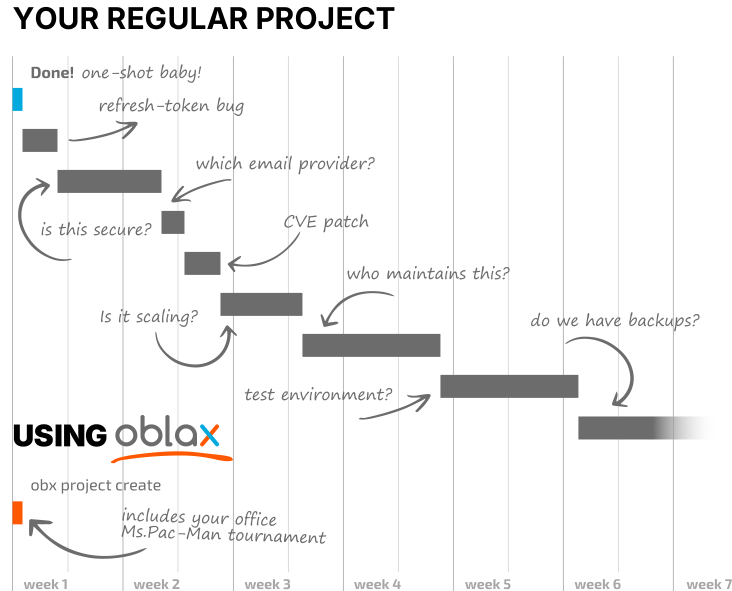
Timeline comparison of a regular project vs using oblax
Cutting the development time

Move fast.
Safely.

AI makes writing code faster, but speed means little if every feature introduces more complexity.

AI can write you a login system in ten seconds. Then you get to review it, test it, secure it, and maintain it… forever. Or you call an API that already does all of that, and spend your time on what makes your app unique. Less code to own means less code to break.

See it in code
Developer experience

Same patterns.
Every module.

One consistent experience across the entire platform. Learn it once, work with any module, through the SDK, API, or CLI.

  • JavaScript SDK
  • cURL/REST
  • obx CLI
const oblax = new Oblax({
  endpoint: 'https://api.oblax.io',
  clientId: 'my-service',
  modules: [PlatformServer(), Auth({ realm: 'webapp' }), Forms(), Templates(), FileManager()],
})
await oblax.auth.session.create({ email: 'you@example.com', password: 'supersecret' })

// 1. Forms — create a contact form
await oblax.forms.create({ name: 'contact', fields: [
  { name: 'email',   dataType: 'email',  required: true },
  { name: 'message', dataType: 'string', required: true },
]})

// 2. Templates — the "thanks" email
await oblax.templates.create({ displayName: 'Contact reply', format: 'html',
  content: '<p>Hi {{.Name}}, thanks for reaching out!</p>', fields: ['Name'] })

// 3. Files — upload the logo
const logo = new Blob([await readFile('logo.png')], { type: 'image/png' })
await oblax.filemanager.upload({ file: logo, filename: 'logo.png',
  contentType: 'image/png', directory: 'images', public: true })

// Every module lists the same way
await oblax.forms.list()
await oblax.templates.list()
await oblax.filemanager.list()
API=https://api.oblax.io/api/v1
CLIENT='oblax-client-id: my-service'

# Sign in (service clients get the token back as JSON)
TOKEN=$(curl -s $API/auth/session/webapp -H "$CLIENT" \
  --json '{"email":"you@example.com","password":"supersecret"}' | jq -r .oblax_access_token)
AUTH="Authorization: Bearer $TOKEN"

# 1. Forms — create a contact form
curl $API/forms -H "$CLIENT" -H "$AUTH" --json '{"name":"contact","fields":[
  {"name":"email","data_type":"email","required":true},
  {"name":"message","data_type":"string","required":true}]}'

# 2. Templates — the "thanks" email
curl $API/templates -H "$CLIENT" -H "$AUTH" --json '{"display_name":"Contact reply","format":"html",
  "content":"<p>Hi {{.Name}}, thanks for reaching out!</p>","fields":["Name"]}'

# 3. Files — upload the logo
curl $API/filemanager -H "$CLIENT" -H "$AUTH" -F file=@logo.png -F directory=images -F public=true

# Every module lists the same way
curl $API/forms       -H "$CLIENT" -H "$AUTH"
curl $API/templates   -H "$CLIENT" -H "$AUTH"
curl $API/filemanager -H "$CLIENT" -H "$AUTH"
obx login
obx project link brave-otter-d8k2m4p6r1t3v5q7s9b0

# 1. Forms — create a contact form
obx app forms init
cat > app/dev/forms/init.json <<'EOF'
{ "name": "contact", "fields": [
  { "name": "email",   "data_type": "email",  "required": true },
  { "name": "message", "data_type": "string", "required": true } ] }
EOF
obx app forms push init

# 2. Templates — the "thanks" email
obx app templates init "Contact reply" --format html
echo '<p>Hi {{.Name}}, thanks for reaching out!</p>' > app/dev/templates/contact_reply_html.html
cat > app/dev/templates/contact_reply_html.json <<'EOF'
{ "key": "contact_reply_html", "display_name": "Contact reply", "format": "html", "fields": ["Name"] }
EOF
obx app templates push contact_reply_html

# 3. Files — upload the logo
obx app files init
cat > app/dev/files/init.json <<'EOF'
{ "file_path": "logo.png", "directory": "images", "is_public": true }
EOF
obx app files push

# Every module lists the same way
obx app forms ls
obx app templates ls
obx app files ls
Works with any frontend

Use any stack you want.
Oblax stays consistent underneath.

No adapters. No custom integrations. One REST API or SDK from any language, any framework, any runtime.

  • React
  • Vue
  • Next.js
  • Nuxt
  • SvelteKit
  • Flutter
  • React Native
  • AI-generated UIs

Works with any HTTP client in any environment.

Why Oblax

Why not just
build it yourself?

  • Complete workflows
  • Your app, your rules
  • Modular, not monolithic
  • One coherent backend
  • Developer first
01 - Complete workflows

More than CRUD.

Saving a row is easy. Knowing who's allowed to save it, what has to happen next, and who needs to hear about it… that's the real work. Oblax handles that part.

02 - Your app, your rules

Keep control of your code.

Build your frontend with whatever you like and talk to Oblax through the API or the SDK. We handle the backend. How you build the rest is your call.

03 - Modular, not monolithic

Start small. Build on.

Need only auth today? Use only auth. Add the rest when (and if) you need it. No all-in-one monster to adopt on day one.

04 - One coherent backend

Everything works together.

Identity, data, business logic, and workflows on one platform. Not five different services duct-taped together and held up by hope.

05 - Developer first

No new habits required.

A predictable API, a practical SDK, and a CLI for the terminal people. Whether you write the code yourself or your AI agent does, it works the same way.

Built for production

Production-grade
from day one.

Prototypes are easy. Production is where it hurts: traffic spikes, crashes at 2am, someone poking at your API. Oblax is built for that part, so you don't have to rebuild your backend once the app takes off.

  • Stateless by design

    Services don't depend on local session state, making it easier to run multiple instances and recover from failures.

  • Built to scale

    Scale your infrastructure as demand grows, without redesigning your application around a new backend.

  • Security built in

    Centralized identity and access control, so security isn't something you bolt on the week before launch.

  • API-first, by default

    Every capability is accessible through a consistent API, with SDKs and CLI tools that fit into your existing development workflow.

For the builders out there

Dev tool maker, agency, or integrator?

Partner with Oblax to extend the platform and reach developers who need exactly what you make.

Limited access

Apply for early access.

We are really close to opening Oblax to the public. So, as it usually goes with these things, we're starting with limited access.

This form helps us gradually roll out the platform while we monitor its performance. Everyone who signs up joins the pre-registration list and gets early access to Oblax. Access will open in stages, not all at once, but everyone will get in eventually.

We'll notify you by email when your access is ready. Your information stays private and is only used for early access updates.